Ashraful Islam – Digital Marketing Consultant in Malaysia


SEO & Digital Marketing Expert in Selangor, Malaysia
I help businesses grow with SEO, Google Business Profile optimization, and Facebook ads. Focused on driving more traffic, leads, and real customers through proven digital marketing strategies.
Ashraful Islam (Digital Marketing Consultant)
September 20, 2026
Why Is My Website Not Ranking on Google? 15 SEO Problems to Check
Why Is My Website Not Ranking on Google? 15 SEO Problems to Check
A website not ranking on Google means your pages do not appear on the first page for the searches your customers use. There is always a reason. Most of the time, it is one of about 15 common problems.
The good news is that you can check most of them yourself in an afternoon. This guide shows you what to look for, why it hurts and how to fix it.
I’m Ashraful Islam, a marketing consultant in PJ and Subang Jaya. I help SMEs across the Klang Valley find and fix the SEO problems that block their leads.
Want an expert to check your site? Book a consultation and we will find the problem together. You can also see my SEO services in Petaling Jaya or my SEO audit service.
Key Takeaways
- A website does not rank when Google cannot find it, cannot trust it or cannot match it to what people search.
- Start with two checks: is the page indexed, and is it blocked by a “noindex” tag or by the WordPress search visibility setting?
- New pages can take days to weeks for Google to crawl, and rankings often take months to grow.
- The 15 problems fall into five groups: access, content, technical, trust and local signals.
- Google Search Console is the best free tool to find these problems.
How do you know if your website is really not ranking?
First, check if Google has indexed your page. Open Google and search for site:yourwebsite.com. If your pages appear, Google knows them. If nothing appears, you have an indexing problem.
Next, check your position the right way. Do not rely on one search on your own phone. Google changes results based on your location, language and search history. Use Google Search Console instead. It shows your average position, your clicks and the searches people used.
Also remember that Malaysians search in English, Bahasa Malaysia and Chinese. A page that ranks for one language may not show for the others.
Problems 1 to 3: Can Google reach your website?
If Google cannot reach your page, it cannot rank it. Check these three problems first.
1. Your site is blocked from indexing
In WordPress, go to Settings, then Reading. Make sure “Discourage search engines from indexing this site” is not ticked. Also check that your pages do not have a “noindex” tag. Developers often turn this on during a build and forget it. Google explains how this works in its guide to blocking indexing with noindex.
2. Your pages are not indexed
Open Google Search Console and use URL Inspection on your page. If it says the page is not indexed, read the reason. Then fix it and click Request Indexing. Also submit your sitemap in Search Console.
3. Your robots.txt file blocks Google
The robots.txt file tells Google which parts of your site to skip. One wrong line can block your whole site. Open yourwebsite.com/robots.txt and look for “Disallow: /”. If you see it, ask your developer to fix it.
If the cause is deeper, a technical SEO service can find it quickly.
Problems 4 to 8: Does your content match what people search?
Google ranks pages that answer the searcher’s question best. So weak or mismatched content is a top cause of poor rankings. Google’s guidance on helpful, people-first content explains what it looks for.
4. Your page does not match search intent
Look at the top results for your keyword. Are they service pages, blog posts or product pages? If you write a blog post for a search that wants a service page, you will struggle.
5. Your content is thin or copied
Short pages with little detail rarely rank. Copied or duplicate text is worse. Write original, useful content with real examples, steps and local details.
6. Two pages compete for the same keyword
This is called keyword cannibalisation. Google does not know which page to show. Merge similar pages or give each page a clear, separate topic.
7. Your titles and meta descriptions are weak
The title tag tells Google and searchers what the page is about. Use a clear title under 60 characters. Then write a meta description that makes people want to click. My on-page SEO service covers this in detail.
8. Your headings and structure are messy
Use one H1 and clear H2 and H3 headings. Ask questions in your headings, as real people do. This also makes your content easier for Google and AI tools to read.
Problems 9 to 12: Is your website technically healthy?
A slow or broken website loses both customers and rankings. Most customers in Malaysia visit from a phone, so mobile performance matters most.
9. Your website is slow
Test your page in Google PageSpeed Insights. Google looks at Core Web Vitals: Largest Contentful Paint (LCP), Interaction to Next Paint (INP) and Cumulative Layout Shift (CLS). Compress large images, remove heavy plugins and use good hosting.
10. Your website does not work well on mobile
Google mostly uses the mobile version of your site to index it. Open your site on a phone. Check that text is easy to read and buttons are easy to tap.
11. You have broken links and long redirects
Broken links (404 errors) waste Google’s time and annoy visitors. Use Search Console or a crawler such as Screaming Frog to find them. Then fix or redirect them with a 301 redirect.
12. You have weak internal links
Internal links help Google find your pages and understand which ones matter. Link your service pages from your blog posts. Also link related posts to each other. Pages with no links pointing to them are called orphan pages.
Problems 13 and 14: Does Google trust your website?
Google prefers websites that show real experience and real people. This is called E-E-A-T, short for experience, expertise, authoritativeness and trust.
13. You have few or poor quality backlinks
A backlink is a link from another website to yours. Good links from trusted local sites, directories and news pages help. Buying cheap links in bulk can harm you. Earn links slowly through helpful content, partnerships and local listings.
14. Your site does not show who is behind it
Add an About page, real names, photos, an address or service area, and clear contact details. Show your reviews and case studies. Also add schema markup so Google can read your business details.
Problem 15: Are you checking the wrong things?
Some sites do not rank because the owner judges results the wrong way. Others lack local signals.
15. You check rankings the wrong way, and your local signals are weak
Checking your own search on your own phone can mislead you. Someone in Bandar Sunway may see different results from someone in Shah Alam. Use Search Console and a rank tracker set to your location.
For local searches, also check your Google Business Profile. Confirm that your name, address and phone number match across your website and listings. Collect reviews and use area names where you truly serve. For the full steps, read my Google Business Profile optimization guide, or see my local SEO services and Google Maps SEO pages.
Which problems should you fix first?
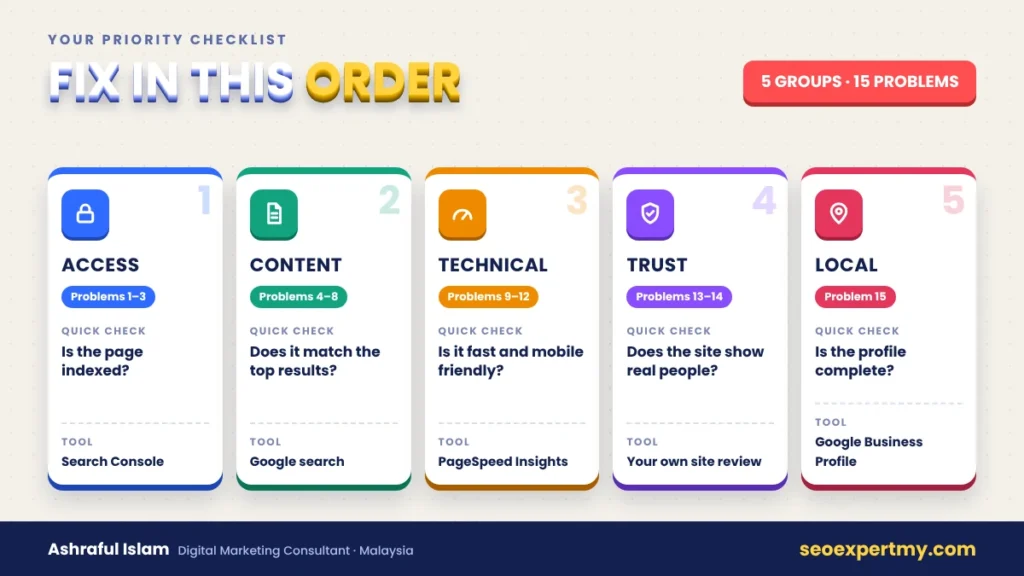
Fix access problems first, then content, then technical issues, then trust and local signals. Here is a simple quick guide.
| Priority | Problem group | Quick check | Tool |
|---|---|---|---|
| 1 | Access (problems 1 to 3) | Is the page indexed? | Search Console |
| 2 | Content (problems 4 to 8) | Does it match the top results? | Google search |
| 3 | Technical (problems 9 to 12) | Is it fast and mobile friendly? | PageSpeed Insights |
| 4 | Trust (problems 13 and 14) | Does the site show real people? | Your own site review |
| 5 | Local (problem 15) | Is the profile complete? | Google Business Profile |
What should you do this week?
Follow this simple plan:
- Check indexing and your WordPress reading setting.
- Submit your sitemap in Google Search Console.
- Compare your page with the top three results.
- Fix your title tag, meta description and headings.
- Test speed and mobile display.
- Add internal links to your key pages.
- Complete your Google Business Profile.
Then wait and measure. Google can take days to weeks to crawl and process changes. Rankings often improve over the next few months.
Frequently Asked Questions
Why is my new website not showing on Google?
A new site may not be indexed yet. Submit your sitemap in Search Console and request indexing. Then give Google time. New sites often need weeks before they appear.
How long should I wait before I worry?
If a page is not indexed after a few weeks, check for blocks. If it is indexed but not ranking, expect months of steady work in a competitive market.
Do I need to pay for ads if my site does not rank?
Not always. Ads bring fast traffic, but SEO builds long-term traffic. Many businesses use both. Read my guide on SEO for small businesses in Malaysia for the full picture, or see my Google Ads service.
Can a slow website stop me from ranking?
Yes. Speed does not decide everything, but slow pages hurt users and can limit your results.
Should I hire an SEO consultant?
Hire one if you cannot find the cause, or if you need a clear plan. A good consultant shows you the data and explains each step in simple words.
Ready to find what is blocking your website?
Start with the seven steps above. If you still see no progress, I can run a full review of your site, your Google Business Profile and your tracking. I work with SMEs in Subang Jaya and Bandar Sunway, Petaling Jaya, Puchong, Shah Alam, Klang and Kuala Lumpur, and across the wider Klang Valley.
About the author
Ashraful Islam is a digital marketing consultant based in Subang Jaya. He helps Malaysian SMEs and local businesses get more leads, enquiries and sales through SEO, local SEO, Google Ads, Meta Ads and ecommerce marketing.
Related services: Digital Marketing Consulting, Performance Marketing and Customer Acquisition Strategy.